
Why journal MT5 trades
MetaTrader shows what happened. A journal shows why.
The History tab in MetaTrader 5 lists entries, exits, commission, swap and profit. It cannot tell you which setup you were trading, whether you followed your plan, or how you felt when you moved a stop. A trading journal adds that layer, and turns it into numbers you can act on.
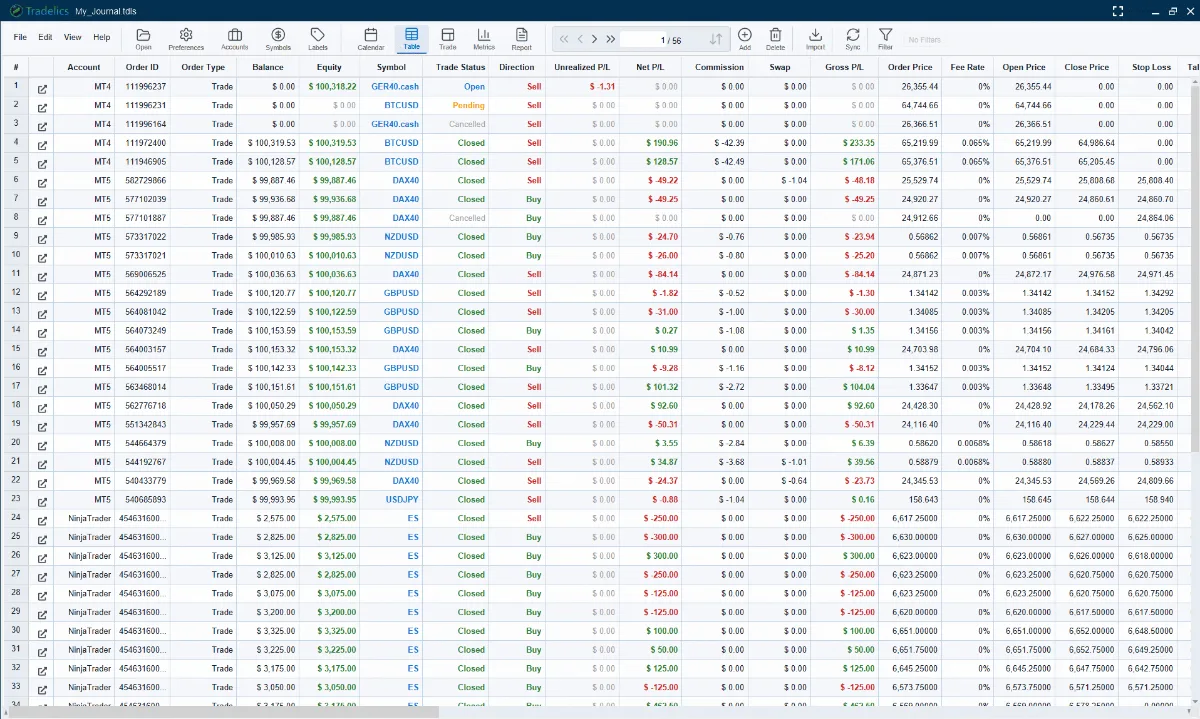
The catch is the data entry. Copying every MT5 trade into a spreadsheet is what makes most journals die in week two. So Tradelics does the import for you, and you spend your time on the part only you can do: tagging the trade with a strategy, signal and confirmation, attaching a screenshot, answering the Trade Review, and writing it up.
Setup
Connect MT5 in a few clicks.
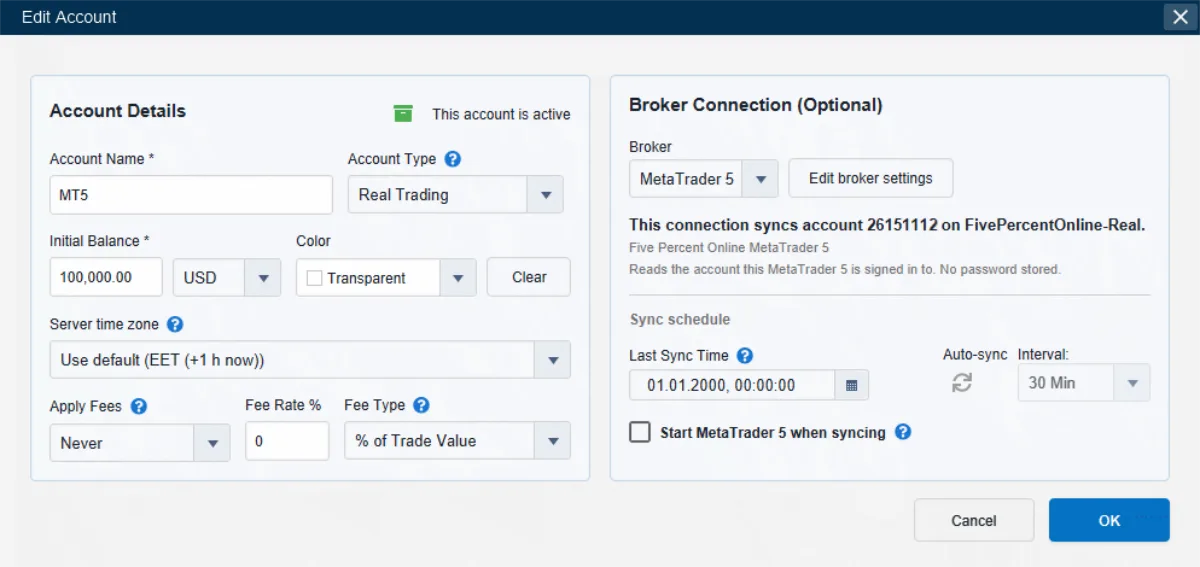
- Open Accounts, select your account and click Edit (or create a new account).
- In the Broker Connection section, choose MetaTrader 5. The setup opens automatically.
- Choose your installation. Tradelics lists the MetaTrader 5 installations it found, by folder name. Pick the one this account trades through, or browse to its
terminal64.exe. - Confirm the account. Press Continue: Tradelics opens that installation, reads which account it is signed in to, and shows you the login, server and broker. If it is the right one, click Link this account.
- Click OK, then Sync. The first sync fetches everything the broker still holds for that account.
Built for several installations. Prop firms each ship their own branded MetaTrader 5, so many traders run two, three or more installations on one PC. Tradelics lists every installation it finds and links each account to the one it trades through, so all your accounts sync side by side, each to the right place.
Usually no password at all. Tradelics reads the account that is already open in your terminal, so there is nothing to type. If you prefer to connect with a login, the investor (read-only) password is all it takes: it is enough for a sync and cannot place or close a trade.
Several accounts in one installation? Tradelics can switch for you. If you want it to, Tradelics signs in to whichever account needs syncing and does the rounds automatically, even in the background. You stay in charge through the MT5 account-switch policy in Preferences: Ask me first, Switch without asking (fully hands-free) or Never switch. Accounts linked by reading the open session simply sync whichever account is open in the terminal.
What gets imported
What comes in from MT5, and what does not.
Once connected, every order syncs automatically: open positions, pending orders and closed trades, not just what has already finished. No guesswork about the limits either.
Imported
- Open positions, pending orders and closed trades, with the broker’s own settled profit, kept exactly as reported.
- Initial stop loss and take profit, read from the order that opened the position — exact, even if you moved the stop later.
- History back to the account’s first trade, in practice. Tradelics asks the broker, not the History tab filter on your terminal window.
- One-minute price bars around each trade, stored for trade charts in a future version.
- Optionally, orders cancelled, expired or rejected at the broker (Preferences → Sync/Import). They are counted in no statistic.
Not imported, or limited
- Anything your broker no longer keeps. Prop firms and brokers retire old account data; older trades can come in from a statement instead.
- MAE/MFE for trades older than MetaTrader’s own 1-minute chart history. Its default keeps roughly 14 trading weeks; raise Max bars in chart in MetaTrader to protect new trades and recover old ones.
- Planned stop and target, unless Tradelics saw the order while it was still pending. Otherwise you enter the plan yourself.
- Your notes, labels, screenshots and ratings. Those are yours, and a re-sync never overwrites them.
Analytics
What you can learn from your MT5 trades.
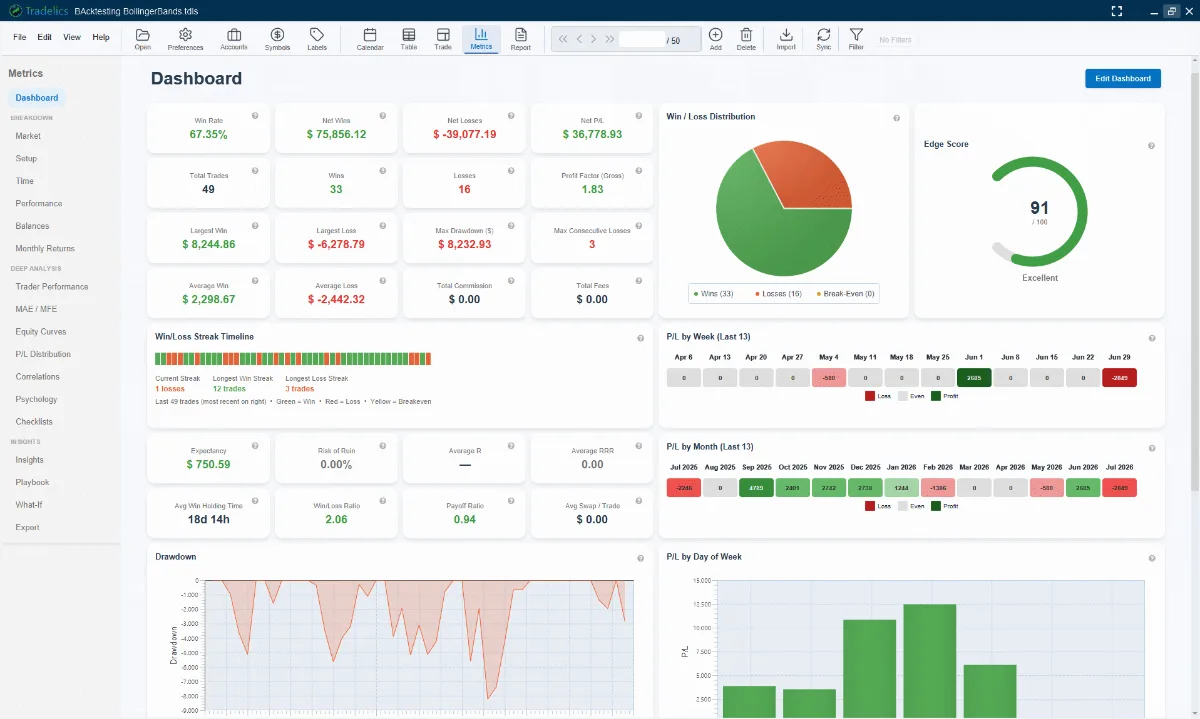
Synced trades feed 18 analytics pages. The Dashboard gives you an Edge Score, win/loss distribution and streak timeline at a glance. Further pages break performance down by instrument, setup and time of day — including an hour-by-day heatmap — and track MAE/MFE, equity curves and correlations between instruments. Your Trade Review answers become psychology analytics.
A calendar shows every trading day at a glance, one filter applies to the Trades table, Metrics and Calendar alike, and P&L is always net of fees. Export any view to PDF, Excel or CSV. See everything on the features page.
Safe and private
Read-only, private and on your own computer.
Your MT5 account is your livelihood. Here is exactly what the journal can and cannot do with it.
Tradelics only ever reads
It never places, modifies or closes a trade. There is no order-placing code to switch on. On the password route, the investor password is enough and cannot trade even in principle.
Your data stays local
MetaTrader 5 is read through a local component that communicates only over 127.0.0.1 (localhost), using an encrypted, certificate-pinned connection. This data never leaves your device and never reaches us.
No cloud, no account
Tradelics reads MT5 straight from your own PC, with no cloud service in between and no account to create. Your journal and analytics open any time. A sync needs MT5 itself to be running and connected to your broker, as always. Tradelics needs internet only for license activation and, if you trade in several currencies, live exchange-rate updates.
No sync? Import a file instead.
Tradelics also imports the MetaTrader 5 full history report (CSV or HTML) via File → Import → Transactions. It detects the format from the file, shows a preview, and flags duplicates so you decide whether to overwrite or import them as new. Handy for trades older than your broker keeps online. Any other CSV works through a custom mapping.
What does it cost?
Tradelics is a one-time purchase: €79 as part of the current Launch Offer for the first 100 customers (regular price will be €149 afterward). There’s no subscription, no recurring charge, and no automatic renewal of any kind. Every purchase includes a 30-day money-back guarantee.
Every purchase includes a period of feature updates at no extra cost — 2 years for Launch Offer customers, 12 months for standard purchases. Everything you receive during that time is yours to keep, permanently. After it ends, your license keeps working exactly as before. If you want newer features later, you can choose to buy a separate 12-Month Update Pass (€59, one-time). Full details on the pricing page and the Updates & Upgrades page.
Want to try it on your own MT5 account first? A free 14-day trial is available via the Microsoft Store, no email, card, or account required. The download page has the details.
MT5 trading journal questions.
Does the MT5 trading journal need my MetaTrader password?
Does MetaTrader 5 have to be running for a sync?
How far back does the first MT5 sync reach?
Can Tradelics place or change trades on my MT5 account?
Does it work with prop firm MT5 accounts?
Is there an MT4 trading journal too?
Do I need an internet connection for MT5 sync?
Can I import an MT5 history report instead of syncing?
Is there a free MT5 trading journal trial?
Journal your MT5 trades without the copy-paste.
One-time payment · 30-day money-back guarantee · No subscription ever
No email, no card, no account needed for the trial.
Keep reading: MT5 setup guide · All features · Pricing · FAQ · Video tutorials · Download · Desktop trading journal